One of the main feature of the Samsung galaxy S8 and S8 plus is its new Assistant (Bixby). The Smart AI powered assistant is meant to act as both source of quick and new method for user to interact with Bixby.

To Use Bixby you have to install some app on your Samsung Device.
1. Install S8 Launcher
2. Install Bixby Apk
How to run Bixby on Samsung Device Running Nougat???
• After you have install Bixby and S8 Launcher go to the homescreen and tap and hold to get S8 Launcher setting. Here's tap on "Homescreen Setting" , and then On "Hello Bixby" settings.

• Tab on "Hello Bixby card" and enable app inside.

• Reboot your phone. When the phone restart , Long press to the Homescreen, and you will see toggle of Hello Bixby. Simply turn it On Bixby.

Once you do this you will have Bixby on your Android device. Granted it won't be full Bixby.

To Use Bixby you have to install some app on your Samsung Device.
1. Install S8 Launcher
2. Install Bixby Apk
How to run Bixby on Samsung Device Running Nougat???
• After you have install Bixby and S8 Launcher go to the homescreen and tap and hold to get S8 Launcher setting. Here's tap on "Homescreen Setting" , and then On "Hello Bixby" settings.

• Tab on "Hello Bixby card" and enable app inside.
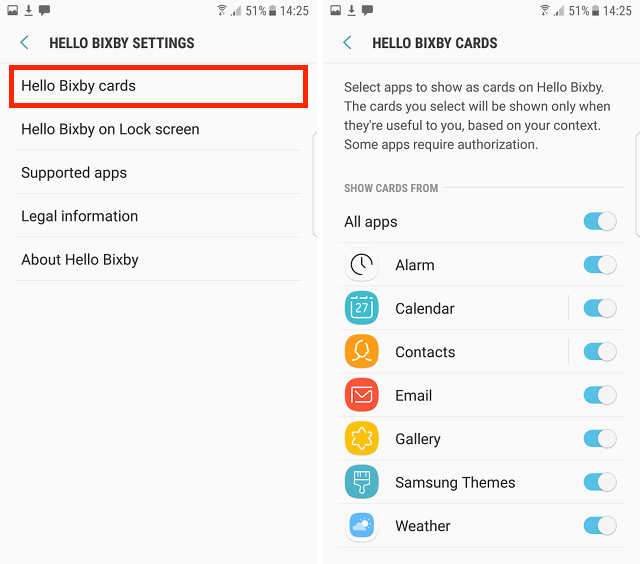
• Reboot your phone. When the phone restart , Long press to the Homescreen, and you will see toggle of Hello Bixby. Simply turn it On Bixby.

Once you do this you will have Bixby on your Android device. Granted it won't be full Bixby.
See also: How to enable Google Assistance in any Android device (without Root)
this article is from beebom.com
ReplyDeleteHello am a samsung mobile user, i have faced some issues regarding g5 and also the same i have heard in s6, i have solved these issues.
Samsung Problems
Fix S5 issues
S6 wont charge
Click here
Website
ReplyDeleteVshare Apk
Download Vshare Apk
Check it once through Android Online Training hyderabad
ReplyDeletegood
ReplyDeleteThis Is How You can install on Samsung device
ReplyDeleteHypster Flames